

Every successful small business relies on transparency and organization. One of the most straightforward but significant ways to do that is through proper receipt management. Receipts are a written record of a transaction, helping you track your income, manage your taxes, and earn customers’ trust. No matter if you’re a freelancer, shop owner, or service provider, learning how to create receipts for your business means a lot for correct financial records.
In this guide, you will learn what a receipt is, its key elements, the types of receipts, and how to write one step by step. You will also learn digital tools, templates, and best practices that make the creation of a receipt easy and professional.
What is a Receipt and Why Does Your Business Need One?
A receipt is a written or digital document that serves as proof of payment transacted between the buyer and the seller. This is the proof one needs to show that he or she has paid for certain goods or services. In addition, a business of any size should have receipts to keep track of sales and provide customers with confidence in their transactions.
Proper receipt documentation is essential during tax filing, tracking your expenses, and resolving financial disputes. To a freelancer or small business owner, knowing how to make business receipts will ensure you are compliant and organized while showing a professional image.
The Evolution of Receipt Creation
Historically, receipts were handwritten on carbon-copy pads or basic templates. As technology progressed, paper systems gave way to automated digital records that could be created in an instant. Today, small businesses can create clean, clear, and branded receipts in a matter of seconds with the use of either a professional receipt creator or accounting software.
With modern business receipt templates, users can now add logos, means of payment, and even digital signatures, all in the cloud for safekeeping and easy access.
Types of Receipts Every Business Should Know
Every business uses receipts differently depending on its operations. The following are some common types you should recognize when you create business receipts:
- Sales Receipts: Issued when payment is received immediately after the sale, such as in retail purchases or food sales.
- Donation Receipts: These are used by nonprofits for the purpose of acknowledging charitable contributions.
- Cash Receipts: Record cash payments received from customers for goods and services.
- Online Payment Receipts: This is auto-generated once a customer pays through an online platform like Paystack, Stripe, or Flutterwave.
Each of these types has its own purpose in transaction recording and bookkeeping.
Importance of Receipts for Small Businesses
Receipts are more than just proof of payment; they represent the very foundation of financial accountability. Small businesses use receipts for:
- Sales tracking and cash flow monitoring.
- Prepare precise tax returns.
- Settle disputes with customers or suppliers.
- Maintain credibility with clients and auditors.
Key Details Every Receipt Should Have
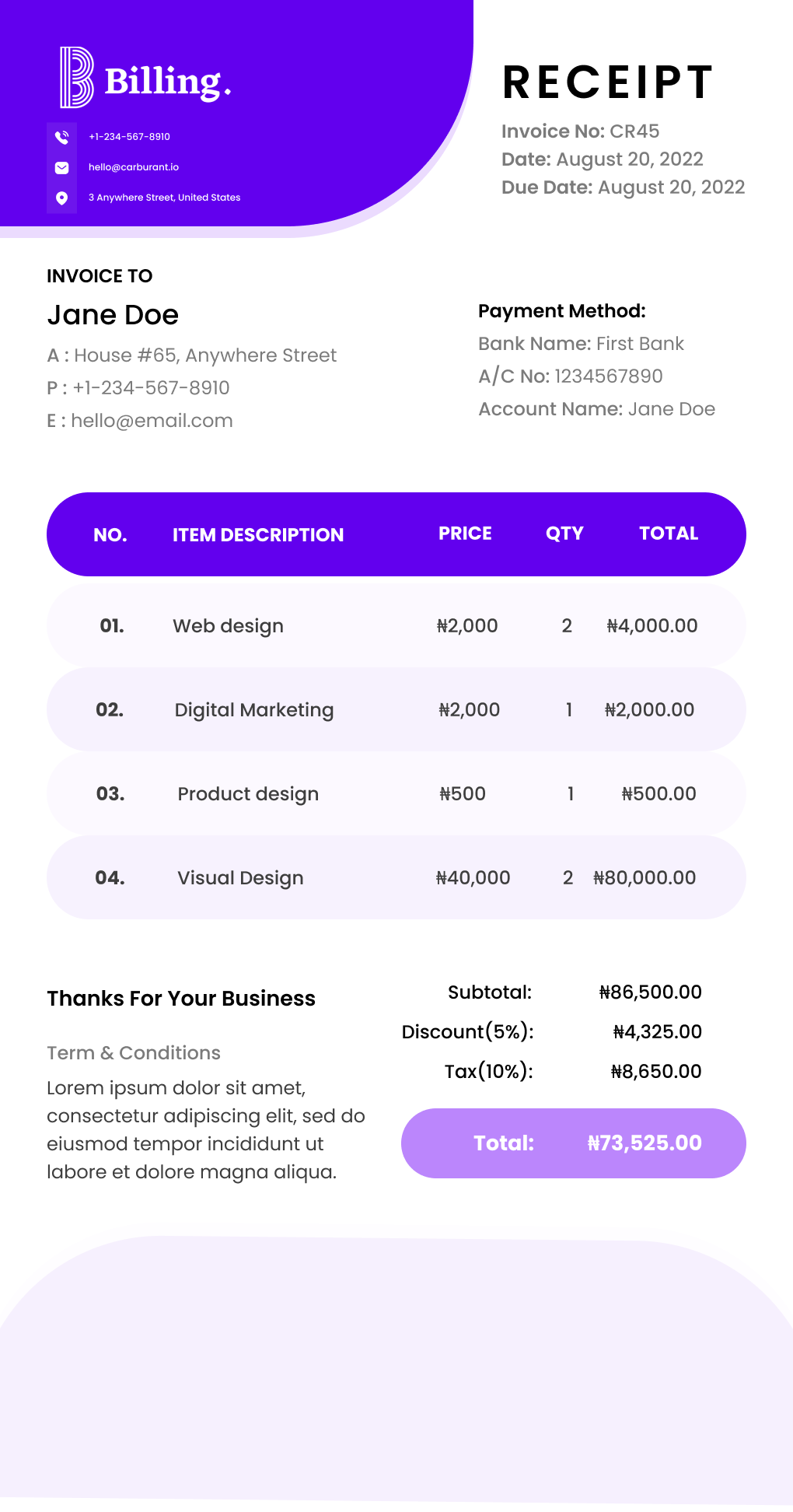
Writing business receipts means including, at the very least, the following information to make them valid and professional:
- The business name and contact details provide visibility for a brand.
- Date of transaction and receipt number for easy reference.
- Description of products or services offered is made specific and clear.
- Payment method – Cash, card, or online transfer.
- Subtotal, taxes, and total amount paid – Break down all the costs.
- Signature or digital confirmation – This is not strictly necessary, but it does help to give an air of authenticity to the document.
Omission of important information might invite accounting errors or tax liabilities later.
Step-by-Step Process for Writing a Receipt on Billing
Learn how to make business receipts that look professional and meet your recordkeeping needs in just a few simple steps.
Step 1: Choose your format
Determine whether you will use a manual or digital format. Digital receipts are time-saving and easier to track.
Step 2: Add your business information
Include your business name, logo, and contact information at the top.
Step 3: Record transaction details
List products or services provided, quantity, unit price, and total amount.
Step 4: Assign a receipt number.
This helps you stay organized and makes recordkeeping easier.
Step 5: Add payment and signature details.
Note how payment was made, including the customer’s signature if appropriate.
Step 6: Review and issue the receipt.
Double-check totals and dates before mailing it physically or sending it digitally to your client
Want to see it in action? Here’s a quick video showing exactly how to create a receipt in Billing. It takes under 2 minutes to watch and is even quicker to do yourself. Check it out here.
Manual vs Digital Receipt Creation
Using a professional receipt creator helps automate the process and eliminates the errors common in manual receipt writing.
Manual Receipts:
- Best for very small operations or cash-only businesses.
- Easy to issue but prone to mistakes and loss.
Digital Receipts:
- Automate the calculation of totals, safely store records, and integrate with accounting systems.
- Eco-friendly and time-saving.
- Digital receipts are increasingly becoming the norm in today’s fast-paced business world.
Receipt vs Invoice: Understanding the Key Differences
Even though both documents are part of business transactions, they serve different purposes.
- Invoices request payment for goods or services offered.
- Receipts are proof that the payment has indeed been made.
Small businesses usually issue an invoice and provide a receipt upon full payment from the customer’s end. Both help to keep transparency and proper financial documentation intact.
Receipt Templates and Tools to Simplify Your Process
You can use a receipt template for business to save time, ensure accuracy, and maintain a consistent brand look across all your transactions.
All these platforms already support custom templates and automation:
- QuickBooks: Produces professional receipts tied to your accounting system.
- Billing+: helps you create professional invoices in minutes, send receipts instantly, and record your expenses in one organized place.
- Wave: A free tool ideal for freelancers and small businesses.
- FreshBooks: allows invoice and receipt creation with expense tracking.
- Canva: Allows you to design branded receipts quickly.
- Zoho Books: All-in-one Accounting and Receipt Solution.
Every Receipt Professional provides templates with the option to add your logo, payment methods, and tax settings.
Benefits of Using Receipt Software
- Saves time through automation of repetitive tasks.
- Reduces human error in calculations.
- Secures data through cloud storage.
- It easily integrates with tax and accounting systems.
- Scales easily as your business grows.
For entrepreneurs learning how to create receipts for business purposes, software solutions provide a cost-effective and error-free system to support growth over the long term.
Common Receipt Mistakes to Avoid
Even experienced business owners make mistakes when writing receipts. Steer clear of these common errors:
- Forgetting to include total amounts or taxes.
- Using vague item descriptions.
- Failure to store digital copies.
- Omitting receipt numbers or transaction dates.
Proofread every receipt before sending it out to ensure that everything on it is correct. Maintaining a good filing system, either physical or digital, also saves a lot of time during audits or tax filing.
Legal Requirements and Best Practices
Every small business should adhere to the laws concerning financial recordkeeping. Normally, the businesses are obliged to:
- Keep receipts for at least 3 to 7 years, depending on the jurisdiction.
- Precisely capture taxes, VAT, or GST wherever applicable.
- Store digital copies on encrypted or cloud-based systems.
Follow these best practices to make your receipts serve as credible evidence in audits or legal reviews. Always act with integrity and keep transparent records.

Frequently Asked Questions on Creating Receipts
- Does a receipt have to show the value-added tax? Yes, for VAT-registered businesses, include the tax rate and total on each receipt.
- Does a receipt require a signature? Not always. Digital receipts can use automated confirmations instead of physical signatures.
- Is a receipt the same thing as an invoice? No. Bills request payment; receipts confirm payment received.
- Is a receipt considered proof of payment? Yes, it’s the official record verifying a completed transaction.
- What is another term for a receipt? It can also be termed as a “payment confirmation”, “sales slip”, or “transaction record”.
Final Thoughts
Creating receipts doesn’t have to be complicated. Using appropriate templates, tools, and processes allows you to provide clear, professional receipts that make bookkeeping easier and help in establishing customers’ trust. Be it your preference for manual formats or digital solutions, understanding how to create business receipts will get you organized and compliant.
Start small, be consistent, and utilize the receipt template for business tools recommended herein to save time and strengthen your financial credibility.