
Understanding what an invoice is and how a simple invoice generator helps in making one is a critical step for every freelancer, entrepreneur, or small business owner.
Put concisely, an invoice is a formal document that the seller issues to a buyer for goods or services provided, requesting payment for such. These include what was sold, how much it costs, taxes, the due date, and the addresses of the buyer and the seller. Think of it as a polite and professional way to say, “Here’s what you owe me and when it’s due.”
Invoices are important for tracking every transaction and keeping a proper record. Whether you’re a freelance designer who is billing your client or a company selling products to another, an invoice provides clear, traceable proof of the transaction.
Today, invoicing has gone far beyond handwritten notes or paper slips. Now, online tools and apps are in place for all sizes of businesses to make the process faster, cleaner, and more reliable. A simple invoice generator allows you to create, customize, and send professional invoices instantly-even right from your phone or laptop.
This article covers everything you need to know about invoices, from the different types and key elements through to how you should create one and common invoicing mistakes you should avoid.
How Invoicing Entered the Digital Age
Decades ago, an invoice was a simple paper document that was typed, printed, or even handwritten and then mailed or hand-delivered to a client. It was a long, tedious process prone to errors, which often led to delays in payments and record-keeping. With businesses growing and cross-border transactions increasing, the need to bill clients faster and more accurately gave birth to electronic billing.
Today, the invoice plays an important part in modern business automation. Instead of having to sift through reams of paper, companies rely on software tools and cloud-based systems to generate, send, and store invoices instantly. This makes the process not only swift but secure and ecologically correct.
With just a few clicks, business owners can now track who has paid, who hasn’t, and even send automated reminders-all in real time. And with everything digital, it’s easier to access records, calculate taxes, and manage accounting data.
Tools like a simple invoice generator lie at the heart of this transformation. They help freelancers, small businesses and large enterprises really create professional invoices in seconds with no accounting degree required. Whether you are in Lagos, Nairobi, or London, an online invoicing tool will keep you organized, bring in your money faster, and keep your records straight without stress.
Most importantly, the rise of digital invoicing has opened the door for global transactions, seamlessly connecting Nigerian freelancers, African startups, and small business owners with international clients. It’s not just about technology; it’s about smarter, more transparent businesses.
Types of Invoices
Invoices aren’t one-size-fits-all; the type you use is often a matter of the kind of transaction between businesses that’s taking place. Be it service provision, sale of products, or ongoing projects, the different types of invoices will help you know which format to use and not get confused in the process of receiving your pay. The following are the common types:
- Proforma Invoice
A proforma invoice is an advance bill before the delivery of goods or services. It provides the estimated costs that enable the buyer to understand what they should expect and prepare for. It’s not a demand for payment, but rather a quote or confirmation of intent. - Sales Invoice
This is the standard type people usually refer to when they say “invoice.” It’s sent after goods or services have been delivered, requesting payment. A sales invoice includes details like the invoice date, amount due, description of items, and payment terms. - Recurring Invoice
A recurring invoice is utilized if one provides services regularly, such as subscriptions or retainer work. It automates the billing cycle, thus allowing you to get paid consistently and timely, rather than having to send invoices manually each month. - Credit Invoice
You use a credit invoice to correct an overcharge or to return money to a client. It reflects a negative amount against the total owed. - Debit Invoice
Unlike a credit invoice, a debit invoice adds extra charges to an already-issued bill, for example, when extra work was done beyond what was agreed to. - Timesheet Invoice
A timesheet invoice allows a freelancer or service provider to track hours worked and bill for those services, based on the hourly rate. - Commercial Invoice
This is utilized in international trade. It provides customs authorities with details about goods being shipped, their value, origin, and the buyer’s and seller’s information.
All of them serve different purposes, but their common goal is to make everything crystal clear between a buyer and a seller. With the help of a simple invoice generator, it would be easier to choose and customize any of these types of invoices, therefore saving time and reducing the likelihood of mistakes occurring.
Importance of Invoices
Invoices are more than just documents requesting payment; they’re vital tools that keep your business organized, professional, and financially healthy. Whether you’re a freelancer, small business owner, or corporate manager, understanding the importance of invoices helps you maintain smoother client relationships and better control over your income.
- Proof of Transaction
An invoice is official proof of the delivery of a product or service. It protects both the buyer and the seller by providing written evidence of what was exchanged, at what cost, and under what terms. - Cash Flow Management
Invoices are crucial for maintaining steady cash flow. They help you track what’s been paid and what’s pending, making it easier to plan budgets, manage expenses, and forecast revenue. Without proper invoicing, many businesses struggle with late or missed payments. - Tax and Accounting Records
Invoices are the backbone of proper bookkeeping, providing vital information for filing taxes, proving your income, and fulfilling compliance requirements. Organized invoices, quicken audits, and made them less stressful. - Professionalism and Credibility
Sending structured, detailed invoices to clients shows that you take your business seriously. It instills trust and exhibits transparency-something that helps in nurturing stronger and long-term partnerships. - Legal Protection
An invoice is a legal document in case of disputes over payments. It outlines the terms agreed upon, due dates, and nature of the service or product, which may be used as evidence in resolving disputes. - Efficiency with Digital Invoicing
Thanks to technology today, one can create and manage invoices without stress. Digital invoicing saves time, reduces paper waste, and helps eliminate manual errors. Tools like a simple invoice generator make the process seamless and fast, hence one can send professional, clear invoices instantly.
Invoices, in short, are crucial in ensuring the stability of finances and building trust between businesses and their clients. They record each transaction, track each payment, and provide professional closure to every deal.
What is an Invoicing System?
An invoicing system is the process or platform on which businesses create, send, and track invoices. It can be done either manually, using spreadsheets or Word templates, or automatically with digital apps devised to ease billing.
A typical manual invoicing system includes handwriting each invoice or creating them in software such as Microsoft Word or Excel. Though it might suffice to work on small, one-off projects, this becomes incredibly time-consuming as your business grows. Keeping track of who has paid, finding mistakes, and following up with clients will eventually lead to missed income and accounting confusion if you do it by hand.
Conversely, an automated invoicing system makes billing faster, smarter, and more efficient. It helps you generate instant invoices, automated tax applications, and track pending payments without additional paperwork. You can also schedule recurring invoices, send payment reminders, and maintain digital records-all in one place with automation.
At Billing, we offer a simple invoice generator that allows you to create professional invoices in seconds. You can customize templates, track payments, and send invoices instantly, all from one clean dashboard. Designed for freelancers and small businesses, our tool simplifies billing so you can focus on getting paid, not paperwork.
Benefits of Using Invoicing Software
Digital invoicing software is not just convenient; it is about running your business smarter.
Here are a few reasons why switching to a digital system makes a real difference:
- Saves Time: Automates repetitive billing tasks, freeing you to focus on your work, not admin.
- Reduces Errors: Automatically calculates totals, taxes, and discounts, therefore reducing human error.
- Ensure faster payments: Integrated reminders and immediate delivery ensure clients are unlikely to delay their payments.
- Keeps You Organized: Keeps all your invoices in one location, allowing you easy access to prior records and providing trends related to your finances.
- Supports Global Business: Accept payments and issue invoices across multiple currencies and languages.
An invoice generator simplifies your invoicing tasks and accelerates your receipt of payment. With this simple generator, managing invoices doesn’t have to be a headache. Be it for one client or hundreds, automation ensures accuracy, professionalism, and peace of mind.
What Information is Required on an Invoice
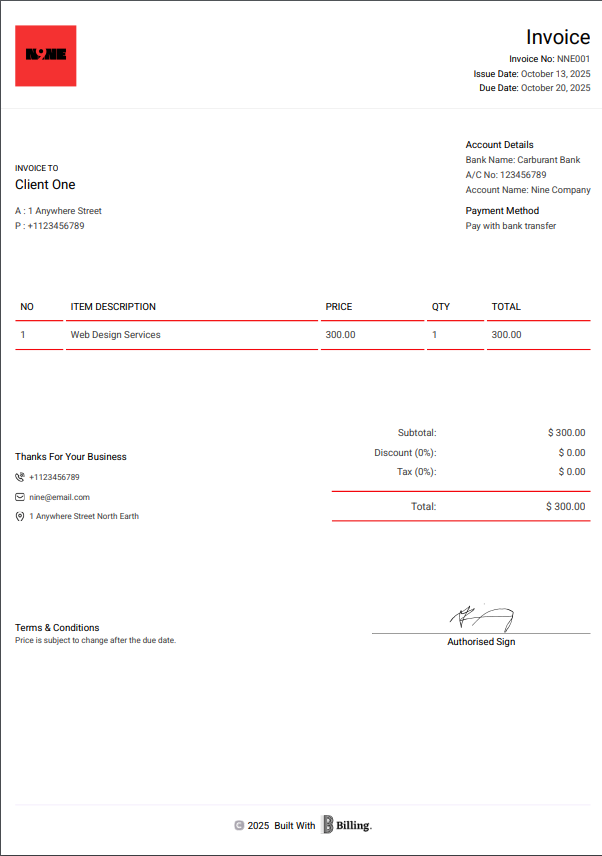
Professional invoices should outline every detail of any transaction to avoid any confusion or delay in payment. Every invoice should contain the following key components, whether you are using a simple invoice generator or creating your own invoice manually:
- Header and Business Information: Start by including your business name and logo, then list the contact information-email, phone number, and address. This makes the invoice instantly recognizable and professional.
- Client’s Information: Include in the header the client’s name, company name (if applicable), address, and contact information to ensure that your invoice goes to the right person or department.
- Invoice Number: Each invoice should have a unique number for record-keeping and tracking purposes. Fortunately, most invoicing systems automatically create these for you.
- Invoice Date: This is the date of issuance of the invoice. It helps both parties keep track of when the payment will fall due and is also useful for accounting and tax purposes.
- Description of Goods or Services: List of products or services provided in clear detail, including quantities, unit prices, and total prices with any applicable tax or discounts. The aim is transparency; the client should instantly understand what they are paying for.
- Total Amount Due: Summarize the overall price to be paid, inclusive of taxes, delivery charges, and any other charges. Ensure the amount is clearly shown in bold or highlighted to easily catch the eye.
- Payment Terms: Specify when and how you expect to get paid; for example, “Payment due within 14 days” or “Due upon receipt.” You can also specify the means of payment, including bank transfer, PayPal, or card.
- PO Number (if applicable): If your client uses purchase orders, include the PO number on the invoice. This connects the invoice with their internal purchase records, which helps large companies process payments more quickly.
- Tax Details (if applicable): Add any necessary VAT or other tax information, depending on your locality. For example, if you are VAT registered, you would add your tax identification number.
- Notes or Additional Information: Close with a brief note thanking them for their business or include helpful reminders, like your policy on late payments or refunds.
Including all this information not only keeps your invoicing process transparent but also helps you to get paid faster. Many digital tools-like a simple invoice generator-automatically include these fields, so you don’t miss anything important.
Receipt vs Invoice: What is the Difference?
Receipts and invoices tend to get confused with each other, though they represent two very different aspects of a transaction. Understanding the difference is key to maintaining your business records and keeping your clients informed.
An invoice is a bill sent before payment, basically a formal request to a buyer for payment for goods sold or services rendered. Think of this as your polite “payment reminder” that includes what was sold, the amount owed, and the due date.
A receipt is issued after payment, as it acts as proof from the seller’s perspective that the buyer has fulfilled their financial obligation. It’s a confirmation of the received money and a sign that the transaction is complete.
Here’s a quick breakdown of how they differ:
| Feature | Invoice | Receipt | |
| Purpose | Requests payment | Confirms payment | |
| Issued | Before payment | After payment | |
| Contains | List of goods/services, price, due date, and payment terms | Amount paid, date of payment, and payment method | |
| Used by | Sellers, freelancers, and service providers | Both buyers and sellers | |
| Legal Value | Serves as a billing document | Serves as evidence of payment | |
You would send an invoice, for example, when you’re a freelance designer, after the client has approved a project, asking for payment in return. Once the client pays, you then send a receipt to confirm the transaction is complete
In short,
- Invoice = “Please pay me.”
- Receipt = “Thank you for paying.”
With digital tools, even a simple invoice generator can make both steps easy: You will be able to create invoices, track payments, and automatically issue receipts once clients pay, keeping your workflow organized and professional.
How to Create an Invoice: Key Things to Know
It is not that complex to create a professional invoice. If you’re a freelancer, small business owner, or consultant, knowing how to format your invoice correctly will ensure timely payment and a paper trail for every transaction.
Here’s a simple breakdown of how to create an invoice step by step:
- Professional Header
Make your invoice appear professional. Include your business name or logo, contact information such as address, email, phone number, and the word “INVOICE” at the top. This enables your client to know what type of document it is instantly. - Add Buyer Information
Write down your client’s name, business name, or any, and contact information. This will help avoid confusion and delays in payments. - Include a unique invoice number
Each invoice must carry an identification number for record-keeping purposes. This allows for easier tracking of payments and the resolution of disputes. - Identify Goods or Services Delivered
Provide clear descriptions of what you charge for, which should include quantities, rates, hours worked, or unit prices. Be as comprehensive as possible. That’s how your client will understand the charge. - Show the Total Amount Due
Add your subtotals, add any discounts or additional charges, and show the total amount owed straightforwardly. Transparency engenders trust. - Specify Payment Terms.
Specify when and how the client should pay. For example, “Payment due within 14 days” or “Payable via bank transfer.” Adding your account details or payment link helps expedite the process. - Include Tax Details (If Applicable)
Depending on the legislation in your country, you would include tax information, like VAT, GST, or withholding tax. Ensure that all relevant rates are accurately calculated. - Add the Invoice Date and Due Date
The invoice date represents the date when you issued the bill, and the due date specifies the date when payment falls due. Both dates are important for identifying overdue payments. - Mention Notes or Additional Information
You can add a brief thank-you note or specific payment instructions. For example: “Thank you for your business. Please reference invoice number #12345 when making payment.” - Use a Simple Invoice
Instead of creating each invoice manually, tools such as a simple invoice generator will automatically handle the whole process. They allow you to personalize templates, automatically calculate totals, and instantly send invoices, save time, and minimize errors.
Smart Invoicing Tips and Best Practices
Creating an invoice is straightforward, but creating one to get paid quickly and that keeps your business organized does involve a bit of strategy. Whether you work as a freelancer, small business owner, or entrepreneur, these smart invoicing tips will keep you professional while improving cash flow:
- Always use a professional layout: A well-organized and clear invoice is where credibility starts. Put your business name, logo, and contact details to make it identifiable for clients.
- Number your invoices consistently: Sequential invoice numbers help you keep records easily and make accounting or auditing easier.
- Establish clear terms of payment: Specify how and when you want to be paid, as in “Net 7” or “Due in 14 days”, to avoid misunderstandings.
- Itemize everything: Break down the goods or services provided, quantities, and prices. Transparency builds trust, and it also minimizes disputes.
- Add taxes and discounts clearly: Show the VAT, service charge, or any discount on different lines to maintain accuracy.
- Send your invoice promptly: The sooner you send your invoice, the sooner you get paid. You shouldn’t wait for days after the completion of a project.
- Use reminders for overdue invoices: Set up an automatic, respectful reminder for bills not paid. Most modern systems can automatically do this for you.
- Keep records by storing digital and printed copies for taxes, accounting, and other legal purposes.
- Personalize the notes: Write a short “thank you” message or some friendly note. A personal touch improves client relationships.
- Use an easy invoice: Save yourself a lot of time and reduce mistakes by using automation. Tools such as these enable you to create, send, and track instant invoices.
These best practices turn invoicing from just a request for payment to a part of your business reputation. A professional invoice reflects reliability, clarity, and attention to detail-all qualities that clients value when choosing who to work with again.

Frequently Asked Questions on Invoice
If you’re new to invoicing, it’s normal to have questions about how it all works, from when to send one to what all those technical terms mean. Here’s a quick guide that breaks things down in plain English:
- What is the invoice date?
- The invoice date simply indicates the date you issued the invoice. It’s a starting point for your payment deadline. For example, if you want to get paid within 10 days, that countdown starts from this date. Think of it as the “official clock” that tracks when your money should arrive.
- What is an e-invoice?
- An e-invoice is a digital version of the traditional invoice, created and sent online. You don’t need to print and send it via email. Instead, you can send it through email or via invoicing software. It’s faster, easier to store, and helps you keep records without the paper clutter.
- What is the PO number on an invoice?
- A PO number or purchase order number is a unique reference number used primarily in business transactions. It helps your client match your invoice with the original order placed by them. It’s like a tracking code that keeps everybody on the same page, especially if you’re dealing with several invoices or orders.
- What is VAT on an invoice?
- VAT means Value Added Tax, which is a small percentage charged depending on the country’s laws on goods or services. If you run a registered business, it is important to include this on your invoice clearly, so your client knows exactly how much of the total is tax-related.
- When should an invoice be sent?
- Unless the client has agreed to specified billing dates, you should send your invoice immediately after your job or delivery is completed. For ongoing projects, many businesses issue partial invoices; for instance, one at the start and one at completion. The bottom line is to bill promptly so that payments are not delayed.
- What should you do if a client doesn’t pay on time?
- If a payment goes past the due date, send a friendly reminder first. Most delays happen by mistake, not refusal. If there’s still no response, follow up with a more formal email referencing the invoice number and original terms. Reliable invoicing software can send automated reminders and even add late payment charges if needed.
- Are invoices legally valid documents?
- Yes, an appropriately raised invoice is a legally recognized record of a transaction. It shows that you have provided a service or product and are owed payment for it. To make it legally sound, make sure your invoice includes the details of both parties, a clear list of services or goods, prices, and agreed payment terms.
Simply put, invoices are not just bills; they are an official part of doing business. Be it freelancing or running a small company, a simple invoice generator makes the process faster and error-free.
To Sum It Up
Knowing what an invoice is and how to use it right can make all the difference in how smoothly your business runs. It’s not just about asking for payment; it’s about creating structure, trust, and accountability in every transaction.
Good invoicing practices prove to your clients that you’re serious, reliable, and professional. Whether you’re a solo operator or manage a small team, the way you bill says a lot about how you do business.
Say goodbye to wrestling with spreadsheets or manual templates. Switch to the smarter solution. A simple invoice generator takes all the guesswork out of billing so that you can focus on what you do best: your work. You’ll spend less time chasing payments and more time growing your business.
Ultimately, every great business succeeds on consistency. Clear communication, prompt invoicing, and professional presentation mean the difference between organized and overwhelmed. Start small, stay consistent, and let technology help you build credibility-one invoice at a time.