

Yes, you can include your bank details on an invoice, especially if you’ll be paid by bank transfer. But including your details on an invoice PDF leaves you open to the risk of an impersonator changing the details before the invoice reaches your client, causing clients to send money to an invalid account.
A payment link is another way to collect payments without displaying your bank details on an invoice. This guide explains what bank details to display and where to display them, how invoice fraud occurs, and why a payment link can be the safer option.
Do You Have to Include Bank Details?
No. You don’t have to include bank details on every invoice, but you should include them if you expect your client to pay by bank transfer.
For local payments, include your account name, bank name, and account number. For international transfers, you may also need your IBAN and SWIFT/BIC code.
If you usually accept mobile money in Ghana, you can include the relevant payment details too. Check with your bank or payment provider to confirm which details your client needs.
Where on the Invoice Do They Go?
Your bank details should be placed near the invoice total and due date, under a clearly labelled Payment Details section.
Include only the information your client needs to complete the transfer. Add the invoice number as the payment reference so that identifying the payment when it arrives will not be an issue.
The Risk: Edited PDFs and Wrong-Account Scams
There is every possibility of having an invoice intercepted by a scammer. What they do is that they replace your bank details with their own account number, and then they would send the altered copy to your client. If your client does not confirm first before paying, the money goes into the wrong account. This is one form of invoice fraud.
To reduce the risk of fraud:
- Use one consistent channel: Send invoices through an agreed email address or business communication channel.
- Confirm changes separately: If you change your bank details, notify the client through a second, previously agreed channel.
- Verify unexpected requests: Never change payment details based on a message alone. Contact the business using a trusted phone number or contact method to confirm the change.
The Safer Option: A Payment Link
A payment link gives your client a direct route to a payment page instead of asking them to copy account details from an invoice PDF. This reduces the risk of someone changing the account number on the invoice and redirecting the payment.
With Billing+, you can add a payment link to an invoice after connecting a supported payment gateway. Your client can then pay through the available options, such as bank transfer or card, depending on the gateway you connect.
To use it, connect your own gateway account once. The Billing+ payment link supports Paystack, Flutterwave, Monnify, OPay, Stripe, GoCardless, and PayPal.
Example Invoice With and Without Bank Details
Both options can work. The main difference is how your client makes the payment.
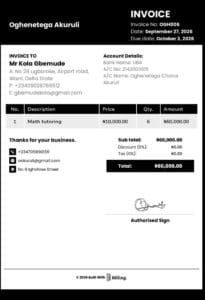
Above is an invoice that includes bank details.
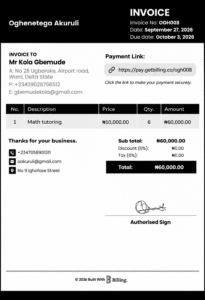
And now this is an invoice that uses a payment link instead.
When you include bank details, your client must enter the account information correctly before making the transfer. With a payment link, they follow the link to the payment page instead. If someone alters the invoice PDF, the printed bank details could direct payment to the wrong account.
Frequently Asked Questions
1. Is it safe to put bank details on an invoice?
Yes, including bank details on an invoice is safe, as it is a common method for receiving bank transfers. However, there is some risk, as fraudsters could intercept the invoice. Therefore, it is advisable to send an invoice via a secure channel.
2. What bank details should I include on an invoice?
For a local bank transfer, include your account name, bank name, and account number. For international payments, your client may also need your IBAN and SWIFT/BIC code. Confirm the exact requirements with your bank.
3. Can I offer both a payment link and bank details?
Yes. You can give clients both options so they can choose how to pay. Make sure the invoice clearly separates the payment instructions to avoid confusion.
4. What if my bank details change?
Notify your clients through a trusted communication channel and ask them to verify the new details before making a payment. Do not rely on an unexpected email or message alone.
Final Thoughts
Both payment links and bank transfers can work well for invoicing, but the best option depends on your business needs. Payment links typically offer faster, more convenient payments, while bank transfers remain a reliable, traditional option. In many cases, offering both options gives clients the flexibility to choose how they prefer to pay.