
 Arabic
 Spanish
 French
 Dutch
Dutch German
 Italian
 Portuguese
 Swahili
Meet Bella, your AI invoice assistant
Ask who owes you money. Turn a sentence into an invoice. Chase everyone who's overdue in one tap. Bella works inside Billing Plus, on the web and in the app.
5 free messages on any account, then upgrade to Premium to keep chatting.
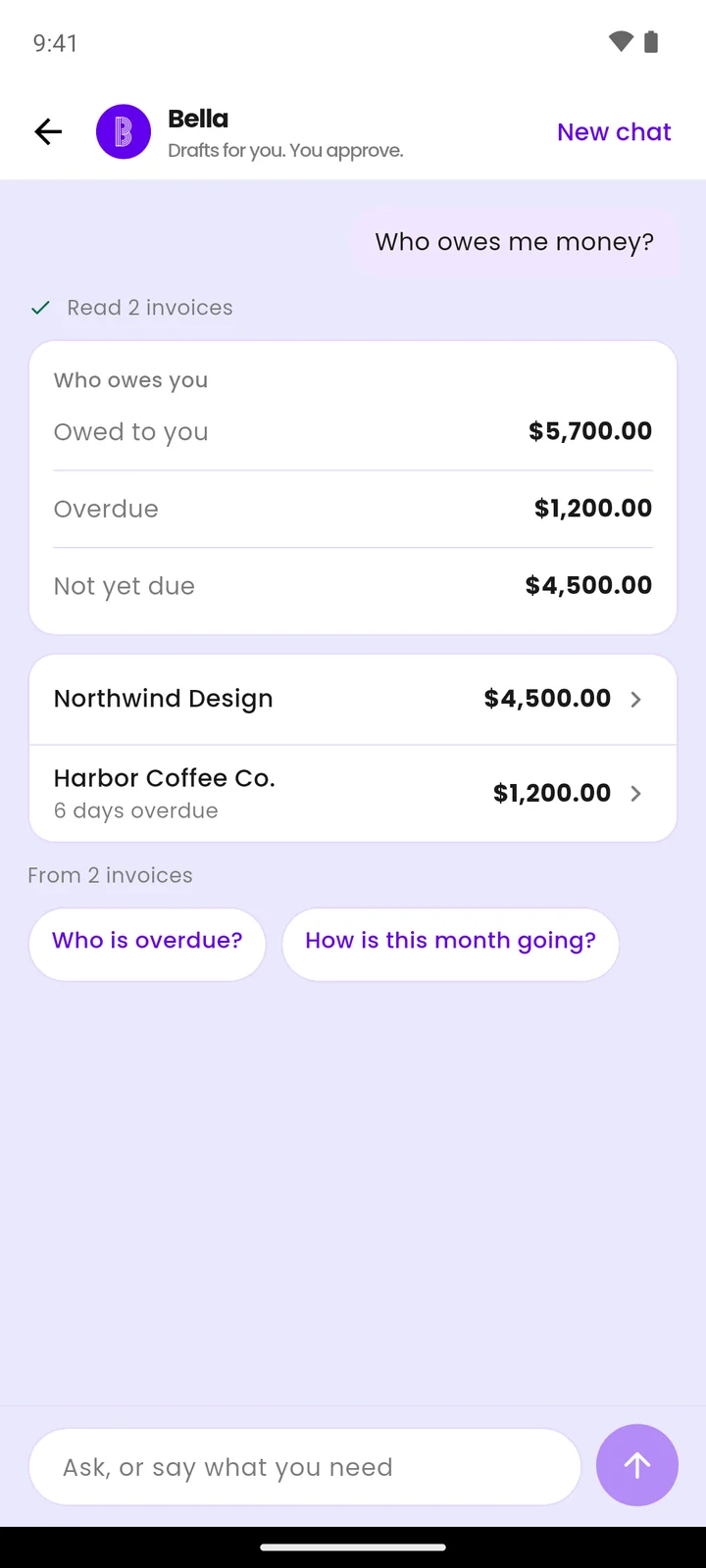
Ask in plain words
Bella reads your own invoices, clients and products, then answers with a card you can act on. No report to build, no filters to set.
Turn a sentence into an invoice
Type it the way you'd say it out loud. Bella fills in the form and hands it straight back to you.
You type
“Invoice Acme for 2 web design at 300”
Bella drafts
It opens in the normal invoice form. Nothing is saved until you save it.
Drafts for you. You approve.
Bella does the typing. The decisions stay yours.
Ask in plain words
"Who owes me money?" "Invoice Acme for 2 web design at 300." However you’d put it.
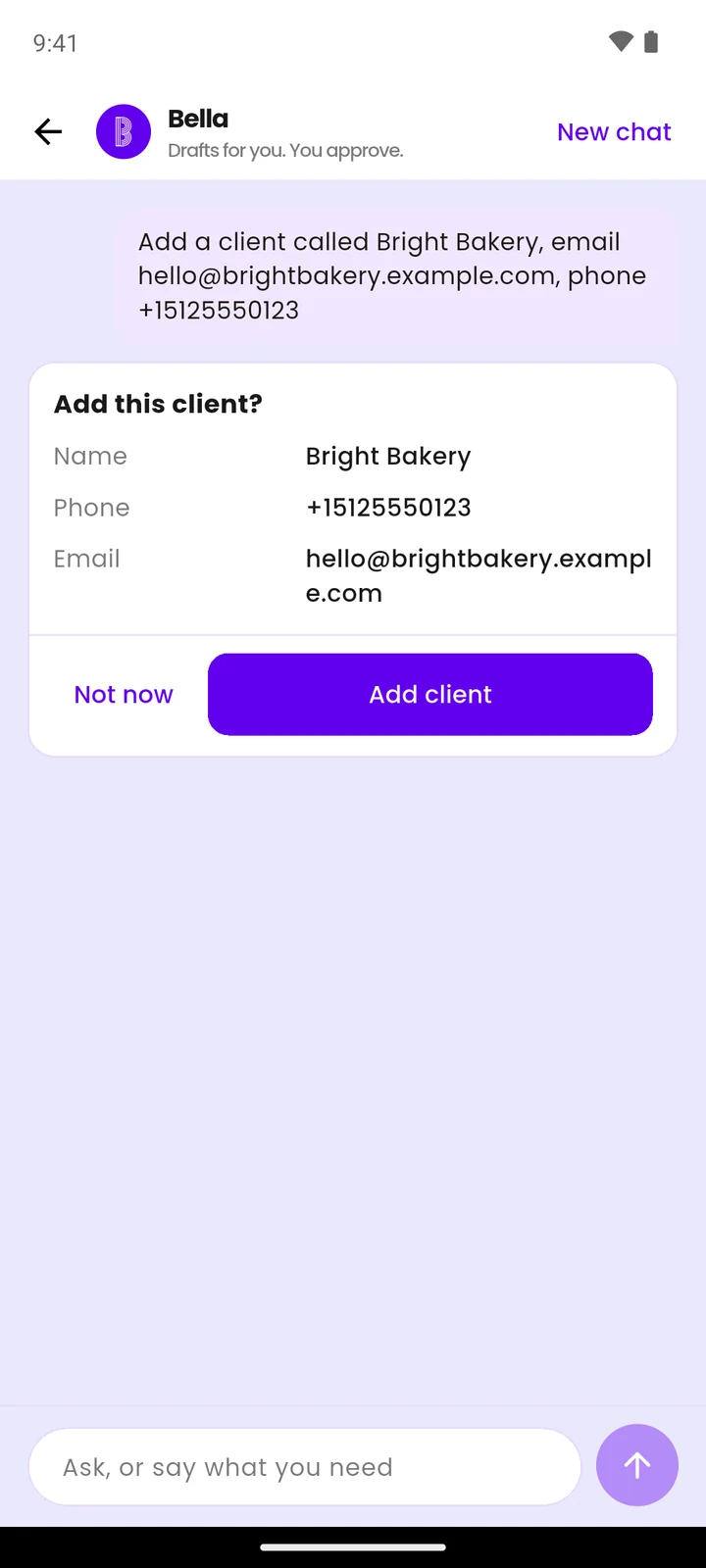
Check the card
Add a client, log an expense, email an invoice — each one shows you what it’s about to do, then waits.
Tap, or don’t
Change your mind and nothing happened. Nothing is created or sent until you say so.
If it isn't clear which client you meant, Bella asks instead of guessing — and only ever sees the business you're signed in to.
Straight answers, before you ask
Worth saying plainly, so nothing surprises you later.
Not your accountant
No tax advice and no reading your bank statements. For anything tax-related, talk to a real accountant.
Your business only
Bella sees the account you're signed in to. Not another business, and not your clients' accounts.
Email, not WhatsApp
Reminders go out by email. You can still share an invoice or a payment link on WhatsApp yourself.
Nothing happens on its own
Anything that creates a record or sends an email waits for your tap first.
What it costs
Bella is part of Premium. Invoices, receipts, expenses and clients stay free forever.
Monthly
$10
a month, stop whenever you like
Yearly
$99
a year, which is two months free
Every account gets 5 free messages with Bella, once, so you can see what it’s like before deciding.
More ways to get paid faster
Chase unpaid invoices
See who is overdue and email all of them in one tap.
AI invoice generator
Describe the job in a sentence. Get a draft invoice back.
Free invoice maker
Make a PDF invoice right now. No account needed.
Invoice app for Nigeria
Naira pricing, local payments, built for Nigerian businesses.
Questions about Bella
The things people ask before trying it.
What is Bella?
Bella is the assistant inside Billing Plus, on the web and in the mobile app — the striped B button. Ask a question about your business in plain words and Bella answers with a card: who owes you money, which invoices are overdue, how the month is going, your top clients and products, what's low in stock. Bella can also draft an invoice from a single sentence.
Does Bella send anything without asking me?
No. Anything that creates a record or sends an email shows a confirmation card first and waits for you to tap. That covers adding a client, adding a product, logging an expense, emailing an invoice and sending overdue reminders. If it isn't clear which client you meant, Bella asks rather than guessing.
Can Bella see my clients' data, or other businesses?
No. Bella only sees the business data of the account you're signed in to. No access to anyone else's business, and no access to your clients' own accounts.
How many free messages do I get?
5, once, for the life of the account. That's any account that isn't on Premium. A typed question counts as a message, and so does tapping one of the suggested questions. Answering a question Bella asked you, tapping a confirm card and opening a draft don't count. After the 5th message you'll need Premium to keep chatting.
Is Bella free?
Bella is part of Premium, which is $10 a month or $99 a year. Every account gets 5 free messages first. The rest of Billing Plus — invoices, receipts, expenses and clients — is free forever on the free plan.
Can I use Bella in the mobile app?
Yes. Bella works in the Billing Plus mobile app as well as on the web, on the same account, so you can ask from your phone or your laptop. If you don't see the striped B button yet, update the app to the latest version.
Does Bella do my accounting or my taxes?
No. Bella answers questions about the data already in your Billing Plus account, and helps you draft invoices and reminders. No tax or accounting advice, and no reading of bank statements. For anything tax-related, talk to a qualified accountant.
Ask Bella who owes you money
Sign in to Billing Plus and look for the striped B. Five messages free, on any account.
Open Billing PlusFree forever plan, no card needed to start.